New Emacs; New Me
Version 31.1 of Emacs was just released. I decided to use this 31.1 release as an excuse to clear out the config cobwebs and start over. Restarting a big config isn’t something I want to do all the time, but I wanted to try and make emacs more comfortable to use, and address some difficulties I was having with navigating buffers, and configuring comlpex things like lsp-mode. This release contains a lot of very nice changes and quality of life improvements that I want to try to incorporate and use. There is a very detailed writeup available here from Mastering Emacs that outlines all of the new features.
One notable area of improvement in the new emacs release is expanded
support for tree-sitter. Tree-sitter integration came to us back in
emacs 29, but adoption has been slow because it was just tough to
integrate. Emacs now offers a way to automatically install grammars
for modes it knows about. That’s fantastic. This and other tree-sitter
improvements should do a lot to increase its adoption. The structural
code navigation that tree-sitter enables is a really powerful tool to
have when writing code. I’ve been used to using strucutral navigation
while writing clojure code using the infamous paredit, but I haven’t
been able to leverage it for much else. I’ve enabled the tree-sitter
versions of several modes I regularly use, and so far it has been
really great. The keybindings are pretty tough though. I might change
those.
I decided to also install some complimentary packages to make navigation across buffers, files, projects, etc a lot easier. They are:
- Marginalia Used for additional annotations for possible completions shown in the minibuffer. Super useful.
- Consult A truly amazing search/completion system. It supports live previews of highlighted completions and narrowing of possible options along with many other cool features.
- Vertico Vertico takes your normal minibuffer completion and makes them vertical. I’ve been using vertico for a long time, and it makes actually leveraging the powerful completion features emacs has much easier.
These three packages have been amazing together. I am still learning how to use Consult, but so far the live-preview has been extremely useful even without knowing all the completion-narrowing tricks yet.
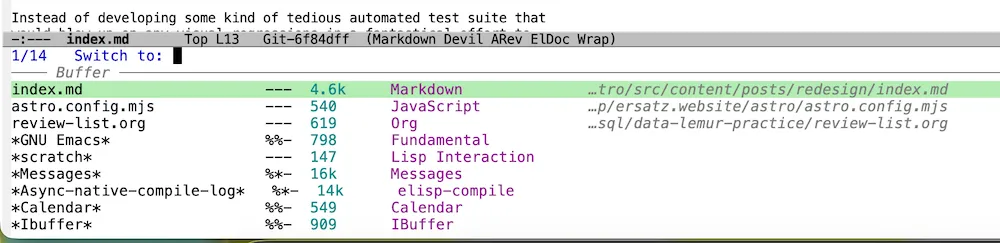
Example of Consult, Marginalia, and Vertico in action together. This is the buffer switch chord C-c b. In vanilla emacs this would be a flat list in a single-line minibuffer. With vertico we have options shown… vertically. On the left are the buffer names which is what you’d expect just using only vertico. Marginalia adds several items of useful information to this minibuffer that makes finding what you want much easier. Consult could be used to narrow down the selection to specific file types.
I’ve moved off of lsp-mode to the built-in eglot as well. I’ve experienced a lot of frustration trying to get lsp-mode functional for various languages. That isn’t necessarily the fault of lsp-mode, but I wanted a clean start. So far, eglot has just worked. It integrates with flymake without me having to do much of anything. Combined with Corfu - eglot has been really smooth to use.
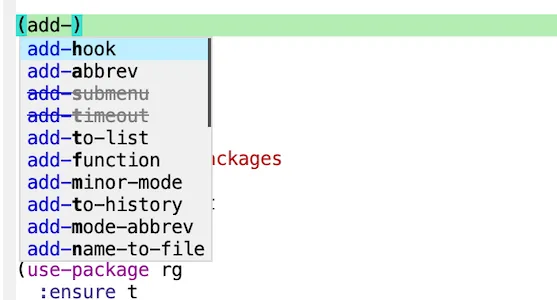
A look at Corfu’s completion dialog while writing some elisp
In my fresh config I’m also trying
devil-mode as a way to do key chords
in a more comfortable way. It lets me use a leader key to start a
chord, then key in the rest of it one letter at a time. I don’t need
to stress my hands trying to reach something like M-%. I’ve also
added the avy package which lets me
type a couple letters and then jump the point straight to several
match candidates. The helix editor has something like this built in,
and it made getting around pretty easy. Happy to have it in emacs now,
too.
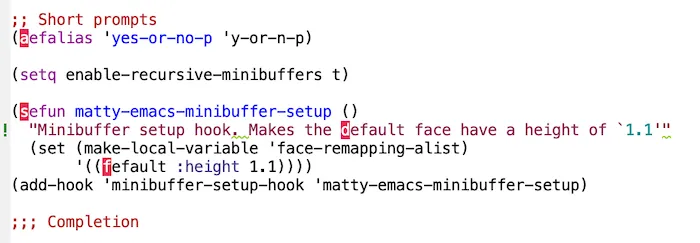
A screenshot of Avy in use. What you’re seeing here in red are ‘jump points’ - places in the buffer that match search characters I pass to avy. In this screenshot I passed ‘de’. I am able to immediately jump to these positions by typing the characters in red. My point will move to that location and the red will be replaced with what was there previously.
So far I am pretty happy with where I ended up. It isn’t a huge config, but it is solid and functional. I don’t want to add anything new - apart from any programming language modes I might need - until I can really get effective with what is here.
You can find my NEW and IMPROVED emacs configuration here.
If you’ve got a lot of leftover cruft in your own config, maybe this is a good time for you to do the same!